> ## Documentation Index
> Fetch the complete documentation index at: https://docs.alertdog.io/llms.txt
> Use this file to discover all available pages before exploring further.
# Webhook
> Receive AlertDog monitoring alerts through custom Webhook, developer-friendly notification method
Introduction: Webhook is a developer-friendly notification method that supports pushing monitoring messages to your custom HTTP endpoints, enabling deep integration with your applications or workflows.
# Setup Steps
## Step 1: Get Webhook
Generate a Webhook URL address on your preferred platform
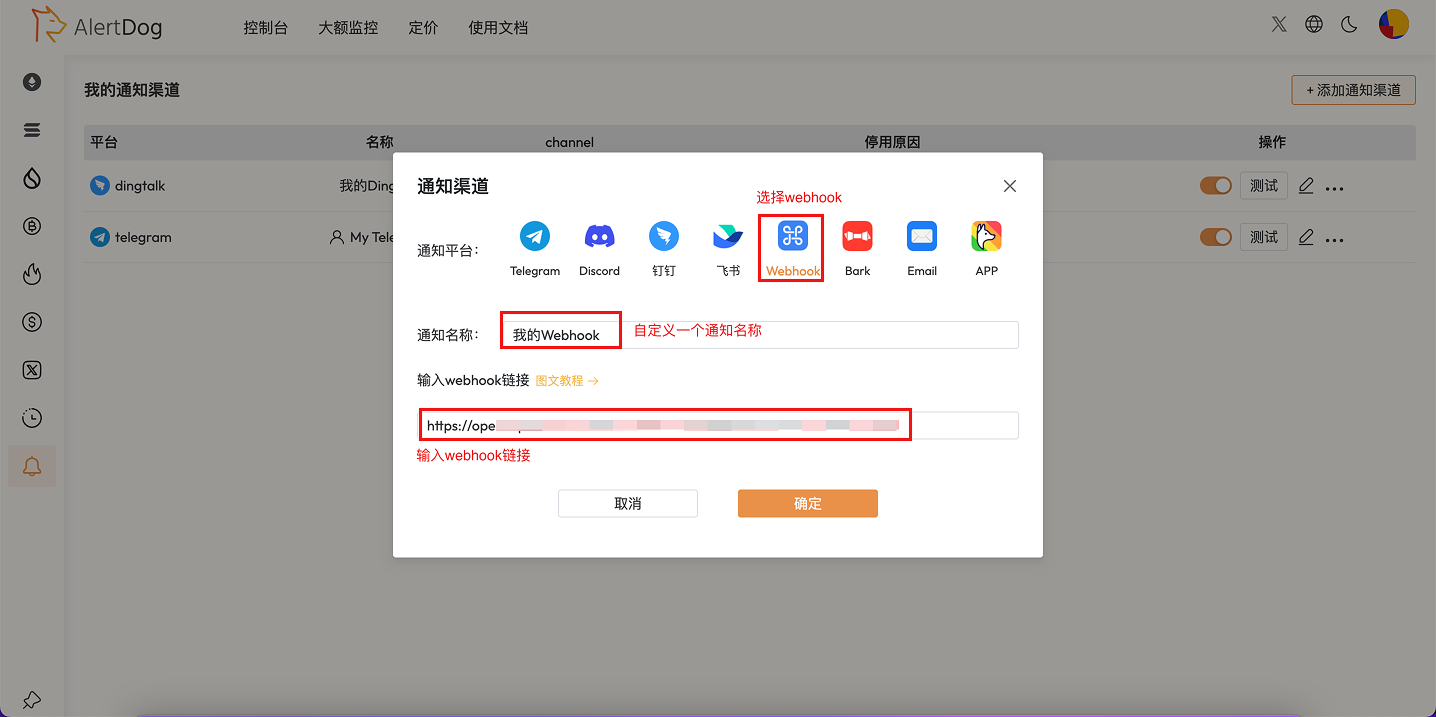
## Step 2: Create Webhook Notification Channel and Configure
Open AlertDog **Add New Channel** -> **Webhook** -> **Enter Webhook URL** -> **Confirm**
 ## Step 3: Complete Addition
Click "Confirm" to complete the Webhook notification channel configuration
## Webhook Message Format
AlertDog will send JSON formatted data to your Webhook URL via POST method:
```json theme={null}
{
"event": "monitor_triggered",
"timestamp": "2025-01-15T10:30:00Z",
"monitor": {
"id": "monitor_123",
"name": "BTC Address Monitoring",
"type": "wallet"
},
"data": {
// Monitoring related data
}
}
```
## Security Configuration
It is recommended to enable signature verification to ensure that received requests come from AlertDog. You can set a unique character when configuring the URI.
Usage Instructions: After configuration, when monitoring is triggered, AlertDog will send a request to your Webhook URL. You can process these requests in your own application to implement custom notification logic.
# FAQ
For security reasons, we enforce the use of HTTPS.
The Webhook request timeout is 5 seconds. If your server response time is too long, it may cause the request to fail.
## Step 3: Complete Addition
Click "Confirm" to complete the Webhook notification channel configuration
## Webhook Message Format
AlertDog will send JSON formatted data to your Webhook URL via POST method:
```json theme={null}
{
"event": "monitor_triggered",
"timestamp": "2025-01-15T10:30:00Z",
"monitor": {
"id": "monitor_123",
"name": "BTC Address Monitoring",
"type": "wallet"
},
"data": {
// Monitoring related data
}
}
```
## Security Configuration
It is recommended to enable signature verification to ensure that received requests come from AlertDog. You can set a unique character when configuring the URI.
Usage Instructions: After configuration, when monitoring is triggered, AlertDog will send a request to your Webhook URL. You can process these requests in your own application to implement custom notification logic.
# FAQ
For security reasons, we enforce the use of HTTPS.
The Webhook request timeout is 5 seconds. If your server response time is too long, it may cause the request to fail.