> ## Documentation Index
> Fetch the complete documentation index at: https://docs.alertdog.io/llms.txt
> Use this file to discover all available pages before exploring further.

# 大额转账监控

> 实时追踪各链的大额转账、巨鲸操作动向、代币增发销毁和交易所充提，精准掌握资金流向，洞察市场风向标

## 大额监控看板

添加大额监控之前, 你可以先浏览 [大额监控看板](https://alertdog.io/whale-alert) 了解实时的鲸鱼钱包转账数据

## 添加大额监控
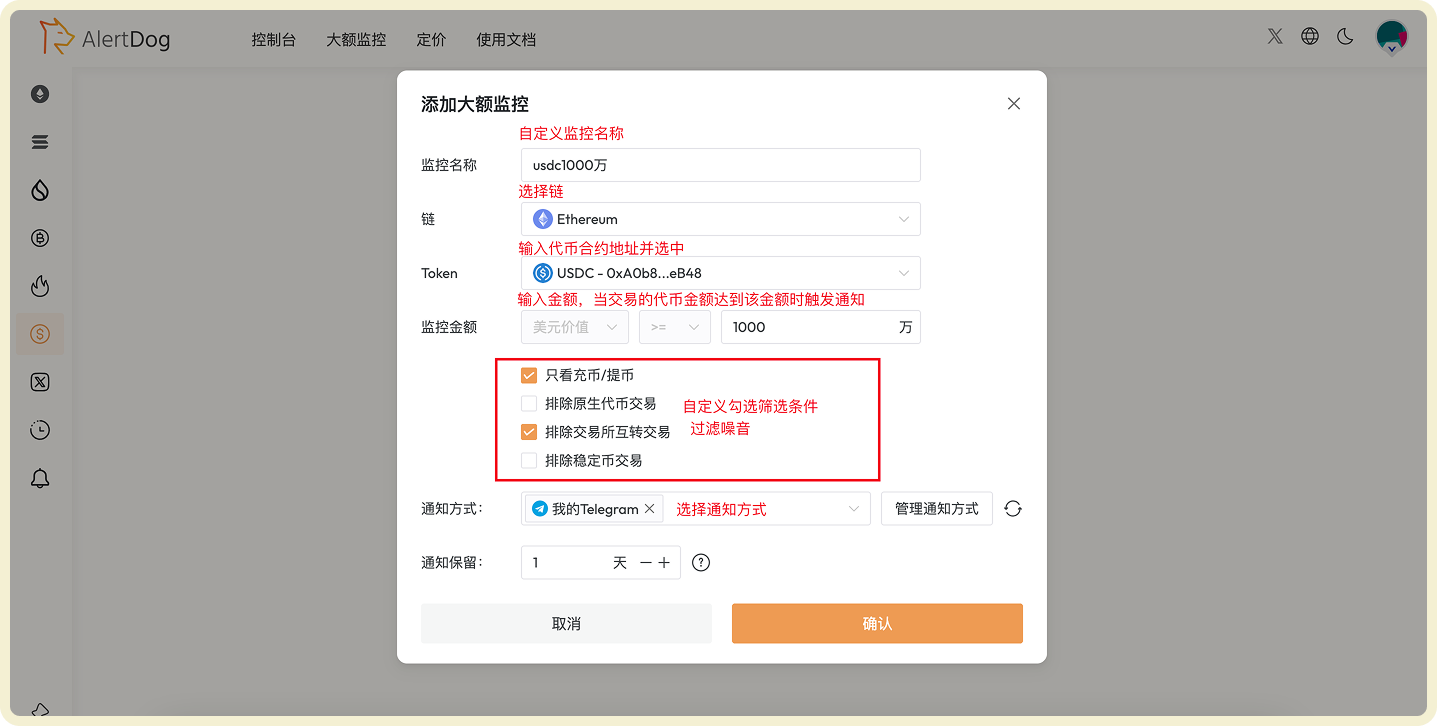
<Frame caption="大额监控配置示例">
  <img src="https://mintcdn.com/alertdog/NmTmCeFNBk4WSdFg/images/monitors/whale-alert/whale-alert-config.png?fit=max&auto=format&n=NmTmCeFNBk4WSdFg&q=85&s=a222dbfabf1d68df46a95d3437820d22" alt="大额监控" width="1437" height="726" data-path="images/monitors/whale-alert/whale-alert-config.png" />
</Frame>

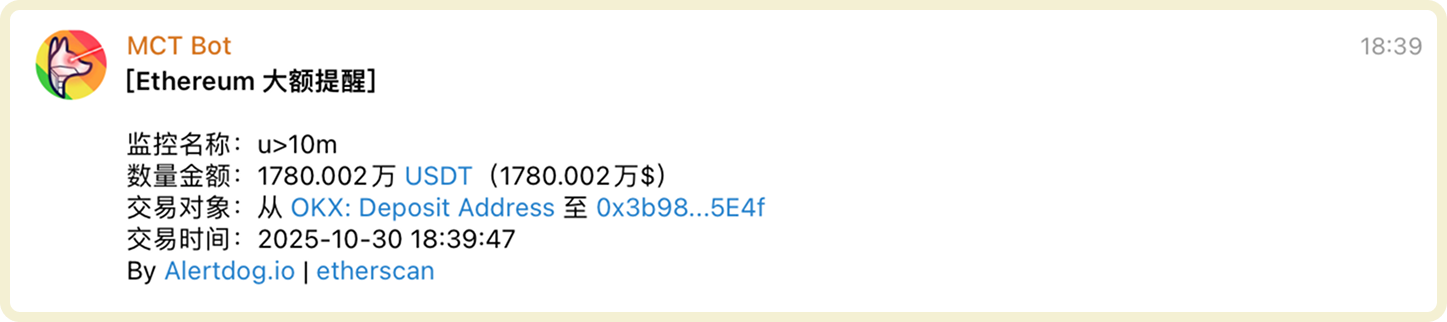
### 大额监控通知示例

<Frame caption="大额监控通知示例">
  <img src="https://mintcdn.com/alertdog/NmTmCeFNBk4WSdFg/images/monitors/whale-alert/whale-alert-notification.png?fit=max&auto=format&n=NmTmCeFNBk4WSdFg&q=85&s=306fb2e1c762c92f25271420da61f6e3" alt="大额监控触发后的通知消息示例" width="1447" height="322" data-path="images/monitors/whale-alert/whale-alert-notification.png" />
</Frame>

## 管理大额监控

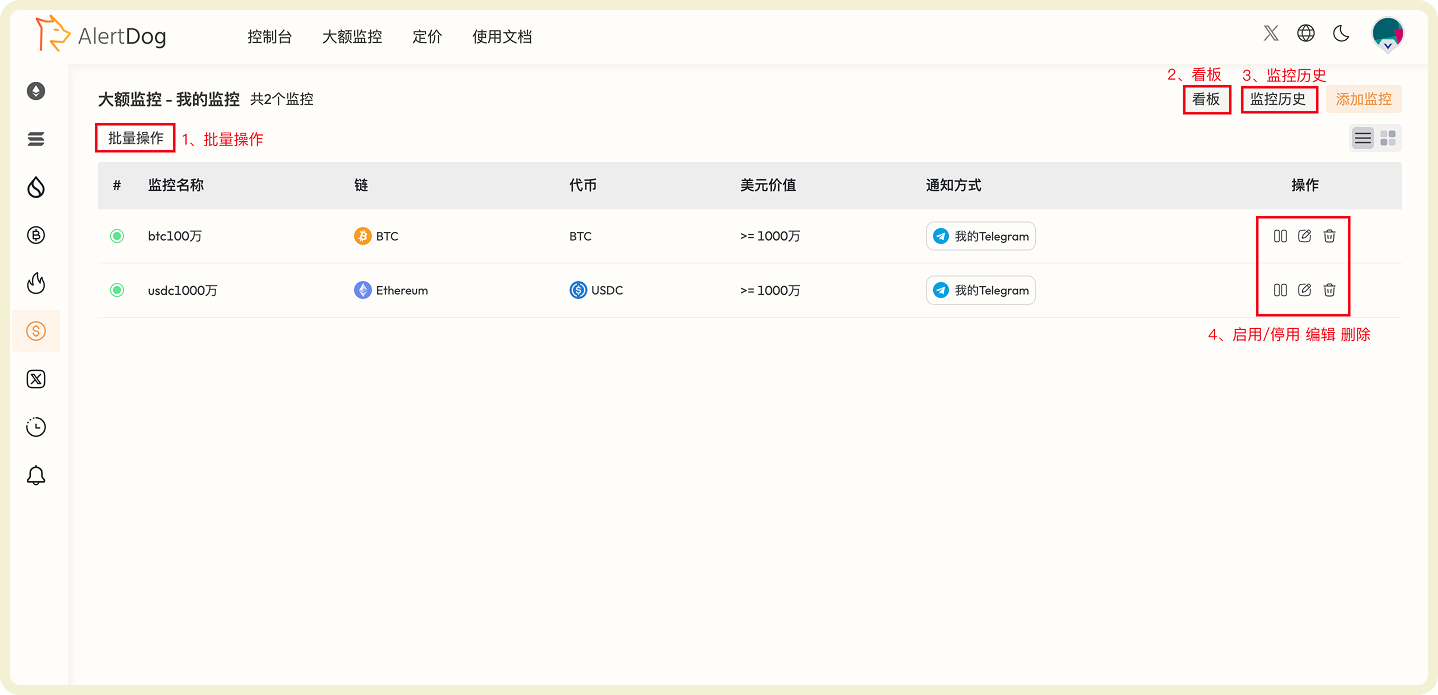
你可以通过以下方式管理已添加的代币监控：

* **批量操作**：点击批量操作，可以对选中的监控进行批量移动组、批量编辑、批量修改通知方式、批量删除的操作
* **看板**：通过大额监控看板，无需手动配置实时查看各链大额交易数据
* **监控历史**：可以在统一的监控历史页查看已收到的监控通知历史
* **启用/停用、编辑、删除**：可以对监控进行启用/停用、编辑、删除的操作

<Frame caption="大额监控管理界面">
  <img src="https://mintcdn.com/alertdog/NmTmCeFNBk4WSdFg/images/monitors/whale-alert/whale-alert-management.png?fit=max&auto=format&n=NmTmCeFNBk4WSdFg&q=85&s=da0a44e98f5d758c90bc4bff007bea80" alt="大额监控列表和管理功能界面" width="1438" height="695" data-path="images/monitors/whale-alert/whale-alert-management.png" />
</Frame>