> ## Documentation Index
> Fetch the complete documentation index at: https://docs.alertdog.io/llms.txt
> Use this file to discover all available pages before exploring further.

# 自定义 Bot

> 通过 Telegram 机器人接收 AlertDog 监控报警消息，即时推送，使用便捷

<Note>
  自定义 Bot 需升级 Pro 后使用
</Note>

## 第一步：创建群组并获取 Chat ID

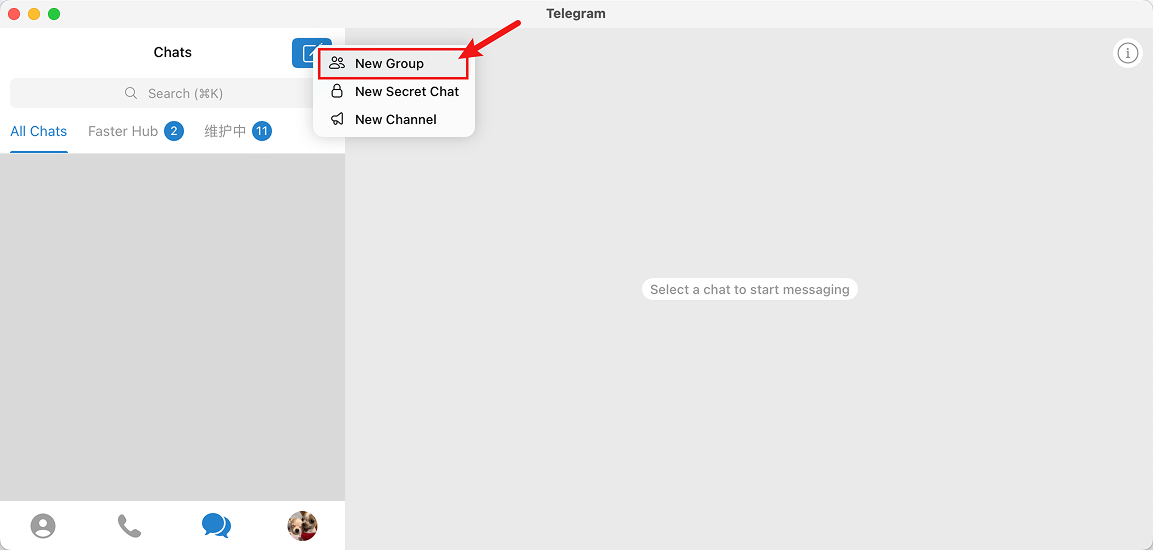
打开 Telegram，创建一个新的群组（或Channel）

<Frame caption="创建一个电报群组">
  <img src="https://mintcdn.com/alertdog/Vee5be0vffUP6yuX/images/notification-channels/telegram/telegram-create-group.png?fit=max&auto=format&n=Vee5be0vffUP6yuX&q=85&s=46794ed3e0f5f6303727617a91835365" alt="创建群组" width="1153" height="550" data-path="images/notification-channels/telegram/telegram-create-group.png" />
</Frame>

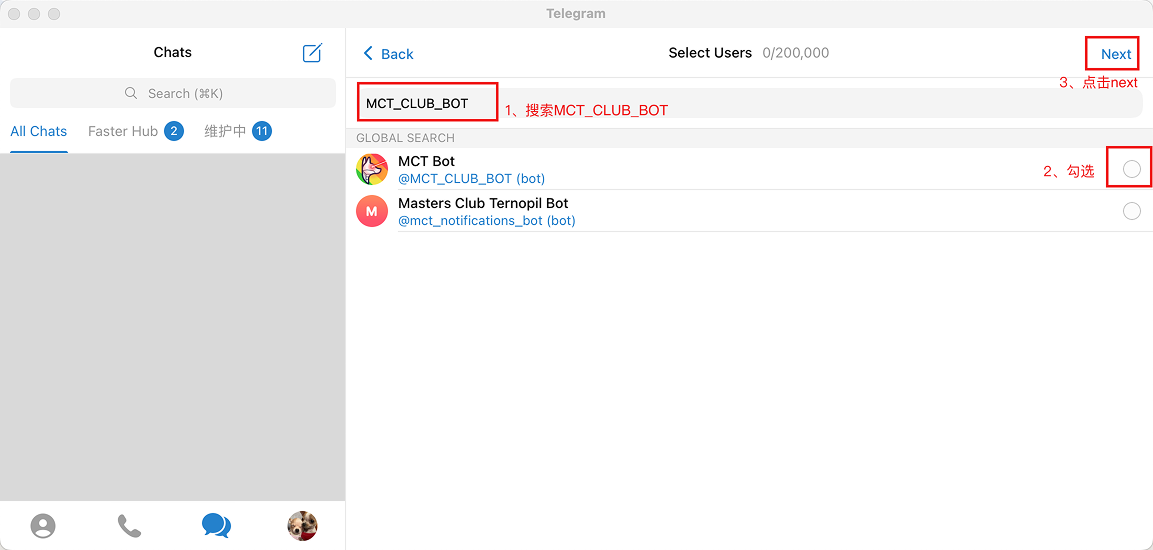
搜索 MCT\_CLUB\_BOT 并将其添加到群组

<Frame caption="搜索 MCT_CLUB_BOT">
  <img src="https://mintcdn.com/alertdog/Vee5be0vffUP6yuX/images/notification-channels/telegram/telegram-search-mct-bot.png?fit=max&auto=format&n=Vee5be0vffUP6yuX&q=85&s=117989aad4276f69e41f182c973d4001" alt="Telegram 搜索 MCT_CLUB_BOT" width="1153" height="550" data-path="images/notification-channels/telegram/telegram-search-mct-bot.png" />
</Frame>

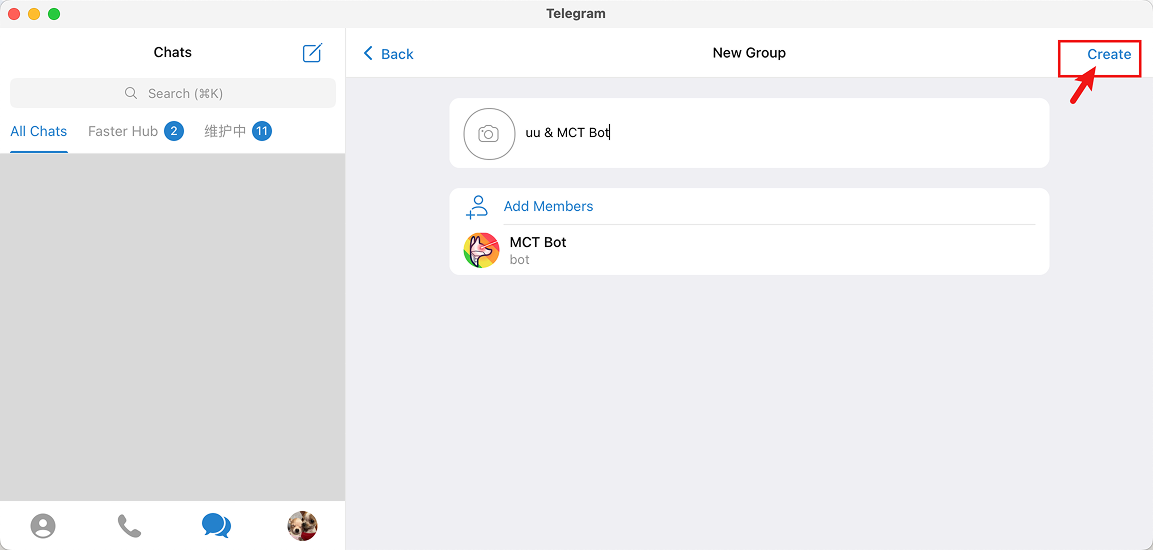
<Frame caption="将 MCT_CLUB_BOT 拉入群组">
  <img src="https://mintcdn.com/alertdog/Vee5be0vffUP6yuX/images/notification-channels/telegram/telegram-add-mct-bot.png?fit=max&auto=format&n=Vee5be0vffUP6yuX&q=85&s=c35d4578df348140dd376578a91e322f" alt="Telegram 添加 MCT Bot 到群组" width="1153" height="550" data-path="images/notification-channels/telegram/telegram-add-mct-bot.png" />
</Frame>

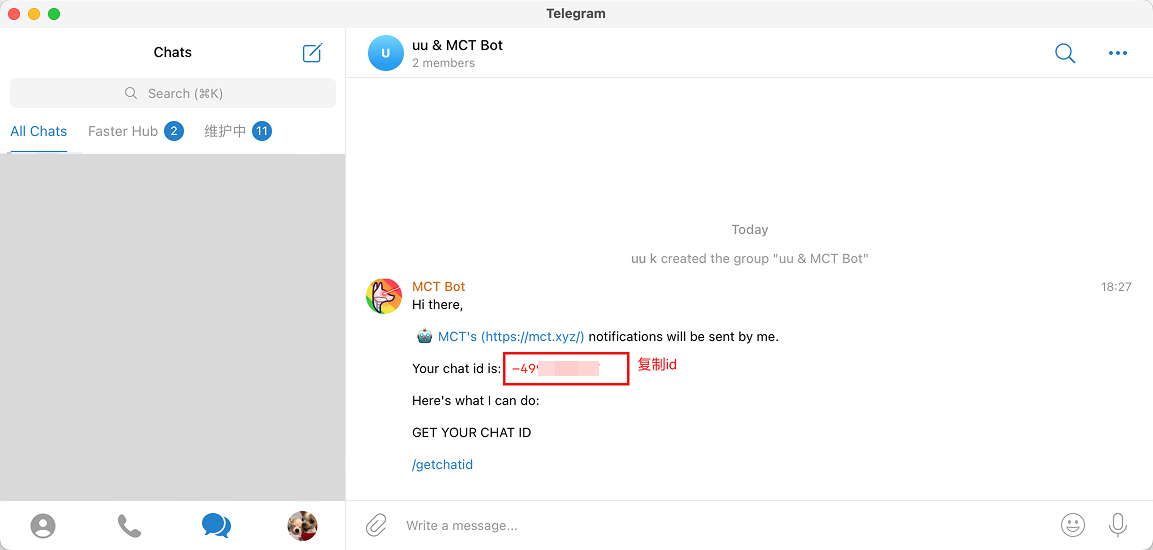
添加成功后，MCT Bot 将会自动在群组里发送 Chat ID，复制 Chat ID 备用

<Frame caption="Telegram 群组的 Chat ID">
  <img src="https://mintcdn.com/alertdog/Vee5be0vffUP6yuX/images/notification-channels/telegram/telegram-copy-chat-id.png?fit=max&auto=format&n=Vee5be0vffUP6yuX&q=85&s=a9a7d4c644a2d69abfc735749da726c7" alt="Telegram 群组的 Chat ID" width="1153" height="550" data-path="images/notification-channels/telegram/telegram-copy-chat-id.png" />
</Frame>

## 第二步：创建你的 Bot 获取 API Token

点 [@BotFather](https://t.me/BotFather) 链接会自动打开 Telegram 与 BotFather 对话，点击 **<Icon icon="list" />菜单** 选择 **/newbot**

<Frame caption="创建新 Bot">
  <img src="https://mintcdn.com/alertdog/RCBluHwjsDCzwhrG/images/notification-channels/telegram/telegram-bot-father.png?fit=max&auto=format&n=RCBluHwjsDCzwhrG&q=85&s=d5149352ed6fecb7aa66af8e1b7d5042" alt="创建新 Bot 并取一个独一无二的名字" width="1506" height="253" data-path="images/notification-channels/telegram/telegram-bot-father.png" />
</Frame>

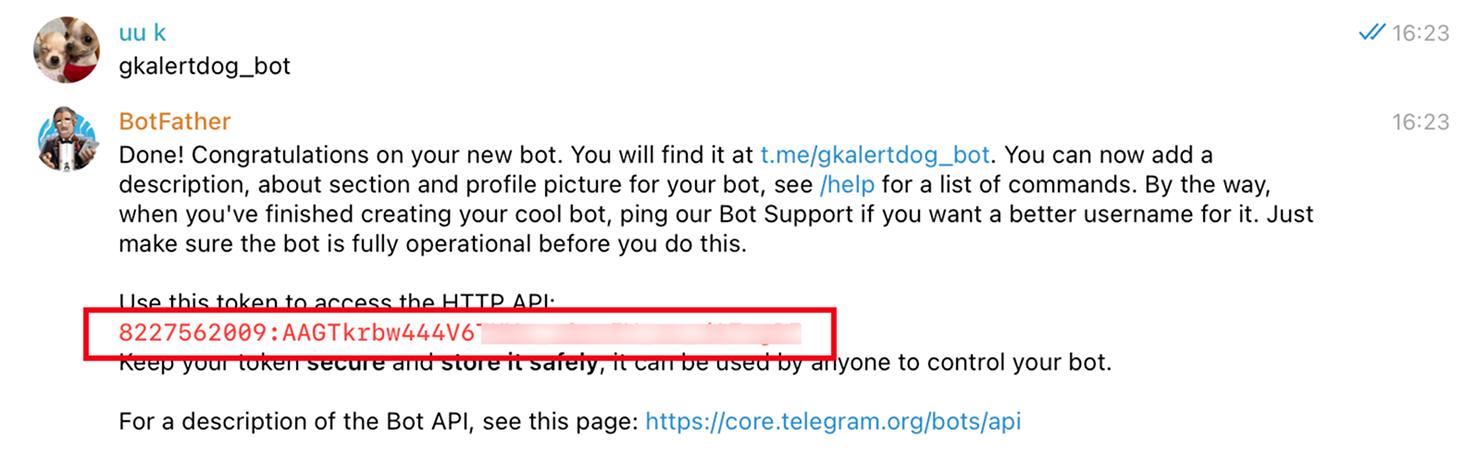
给 Bot 设置一个英文用户名（用户名不能与他人的bot重复），并且必须以 `bot` 结尾

<Frame caption="为Bot设置英文名的截图">
  <img src="https://mintcdn.com/alertdog/Vee5be0vffUP6yuX/images/notification-channels/telegram/telegram-set-bot-username.png?fit=max&auto=format&n=Vee5be0vffUP6yuX&q=85&s=2953c0457b532e65b648741b2e45a556" alt="为Bot设置一个未被使用过的英文名" width="1478" height="252" data-path="images/notification-channels/telegram/telegram-set-bot-username.png" />
</Frame>

正确设置用户名后，将会得到 API Token，复制供下一步使用

<Frame caption="复制 API">
  <img src="https://mintcdn.com/alertdog/Vee5be0vffUP6yuX/images/notification-channels/telegram/telegram-copy-api-token.png?fit=max&auto=format&n=Vee5be0vffUP6yuX&q=85&s=c164df1231cdb4a4e73d4e5b55dc29fc" alt="复制 API" width="1466" height="472" data-path="images/notification-channels/telegram/telegram-copy-api-token.png" />
</Frame>

## 第三步：邀请自定义 Bot 加入群组

将上一步创建的自定义 Telegram Bot 拉到我们第一步创建的有 @MCT\_CLUB\_BOT 的群组
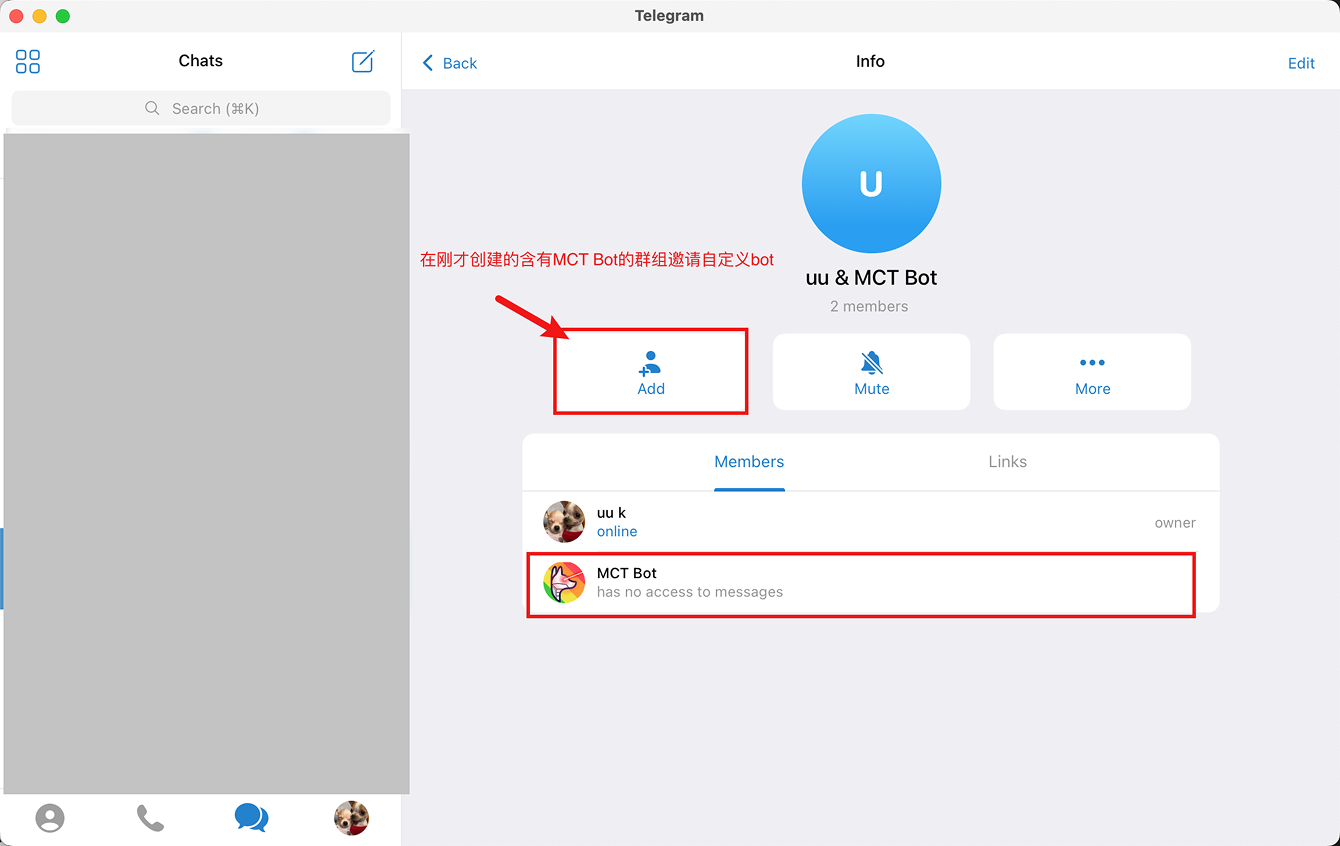
<Frame caption="点击 +ADD 添加组成员">
  <img src="https://mintcdn.com/alertdog/Vee5be0vffUP6yuX/images/notification-channels/telegram/telegram-invite-custom-bot.png?fit=max&auto=format&n=Vee5be0vffUP6yuX&q=85&s=2c290094995ee70b9ab81c66903dd882" alt="Telegram 添加新成员到组" width="1340" height="846" data-path="images/notification-channels/telegram/telegram-invite-custom-bot.png" />
</Frame>

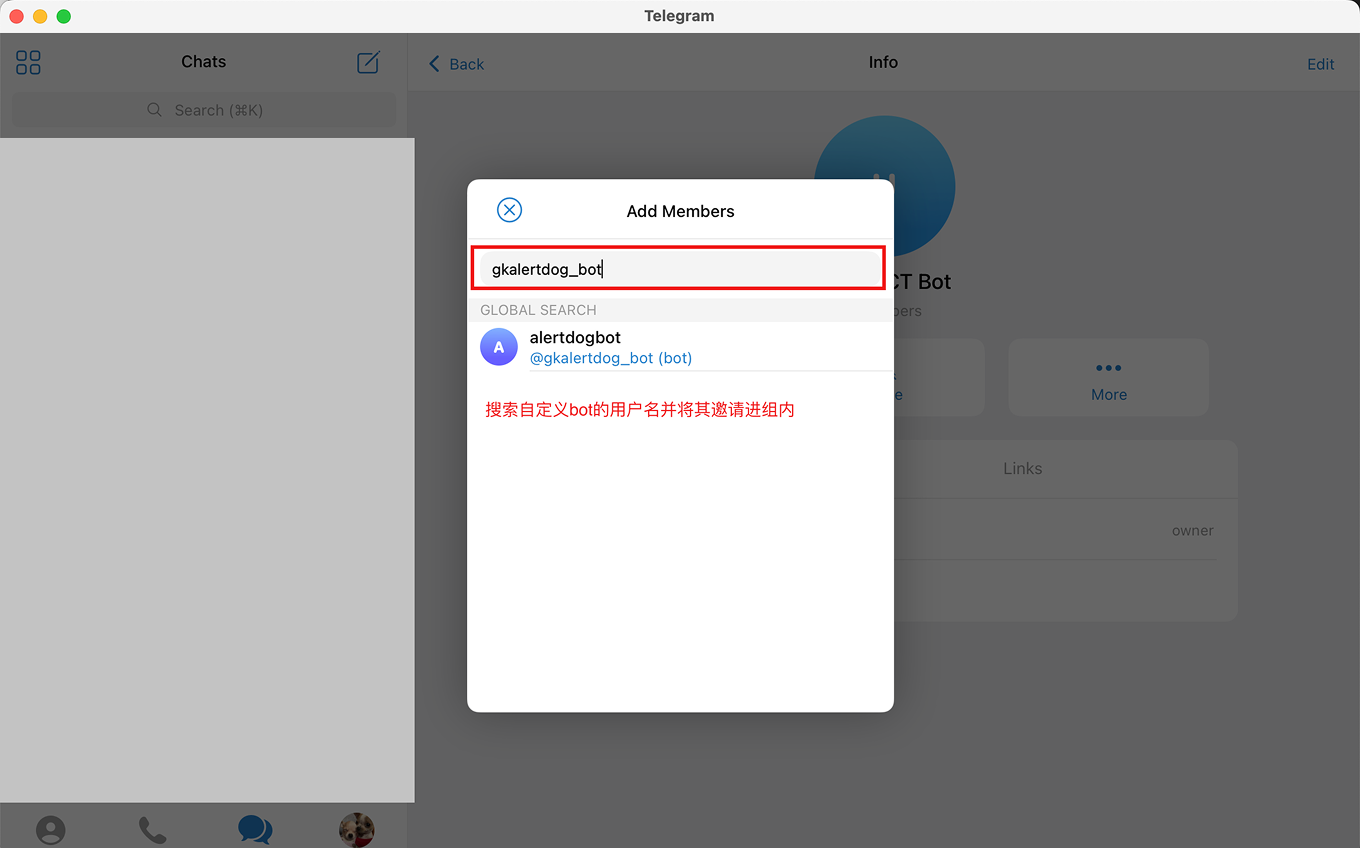
输入你的自定义 Bot 名称

<Frame caption="搜索并邀请自定义 Bot 到群组">
  <img src="https://mintcdn.com/alertdog/Vee5be0vffUP6yuX/images/notification-channels/telegram/telegram-custom-bot-added.png?fit=max&auto=format&n=Vee5be0vffUP6yuX&q=85&s=6c5c7ebc9bac97e56f067e20a781d14e" alt="搜索并邀请自定义 Bot 到群组" width="1360" height="848" data-path="images/notification-channels/telegram/telegram-custom-bot-added.png" />
</Frame>

## 第四步：创建自定义 Bot 通知渠道

打开监控狗 **添加新渠道** -> **Telegram** -> **通知到群组** -> **自定义 BOT** ，分别输入前两步的 Chat ID 和 API Token -> **连接** 确认即可
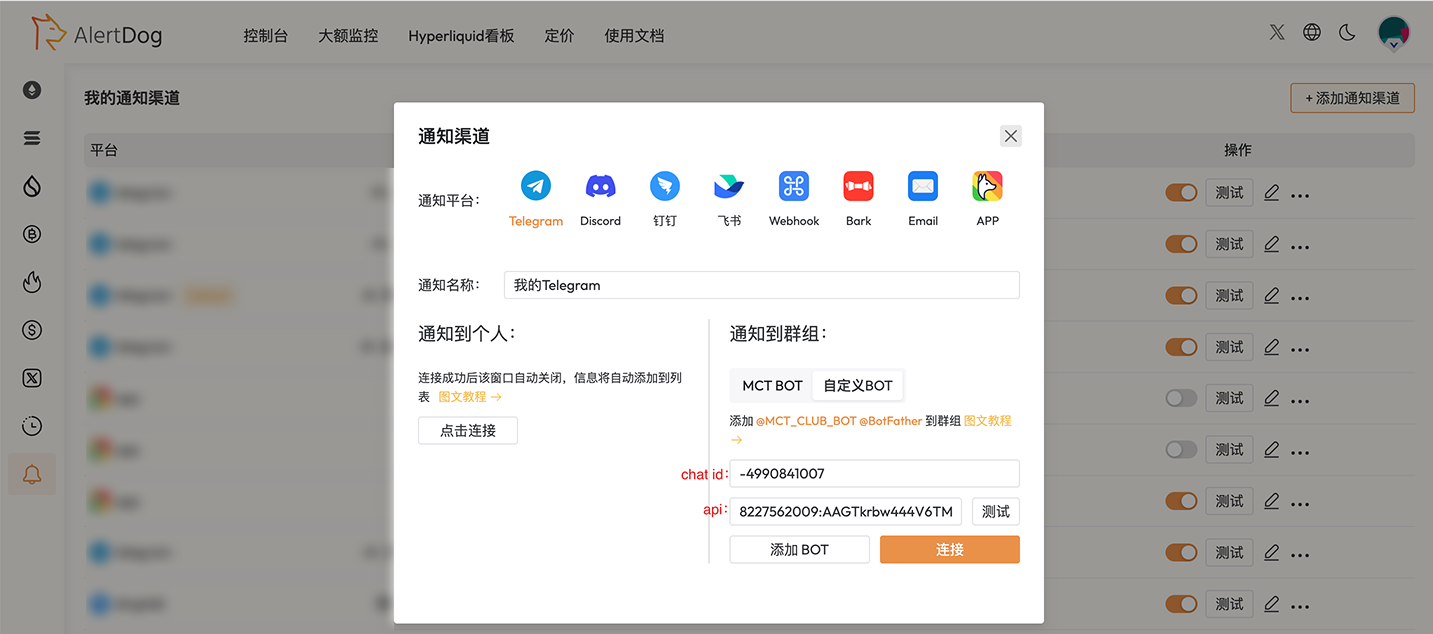
<Frame>
  <img src="https://mintcdn.com/alertdog/RCBluHwjsDCzwhrG/images/notification-channels/telegram/telegram-custom-bot-created.png?fit=max&auto=format&n=RCBluHwjsDCzwhrG&q=85&s=f3ca60a08a9a085f99e8aa952106046b" alt="AlertDog 中创建自定义 Telegram Bot 通知渠道" width="1433" height="634" data-path="images/notification-channels/telegram/telegram-custom-bot-created.png" />
</Frame>

<Check>哇！这么高难度的操作你都搞定了, 佩服佩服！你已成功完成 Telegram 电报自定义机器人的绑定</Check>

## 常见问题

<AccordionGroup>
  <Accordion title="无法设置自定义 Bot？">
    自定义 Bot 需升级 VIP 后使用：[https://alertdog.io/price](https://alertdog.io/price)
  </Accordion>

  <Accordion title="自定义 Bot 用户名设置不成功">
    用户名设置注意需同时满足以下两点：1. 用户名不能与他人相同；2. 必须以 'bot' 结尾，并且不要使用数字
  </Accordion>

  <Accordion title="可以创建绑定多个自定义 Bot 吗？">
    可以。
  </Accordion>
</AccordionGroup>