> ## Documentation Index
> Fetch the complete documentation index at: https://docs.alertdog.io/llms.txt
> Use this file to discover all available pages before exploring further.

# WeCom企业微信

> 企业微信发送

## 第一步：企业微信创建群聊消息推送

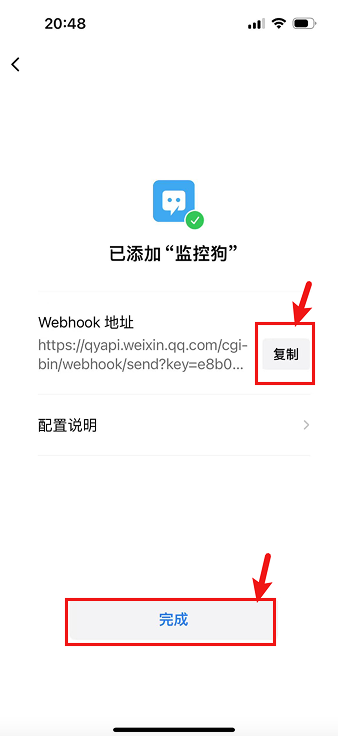
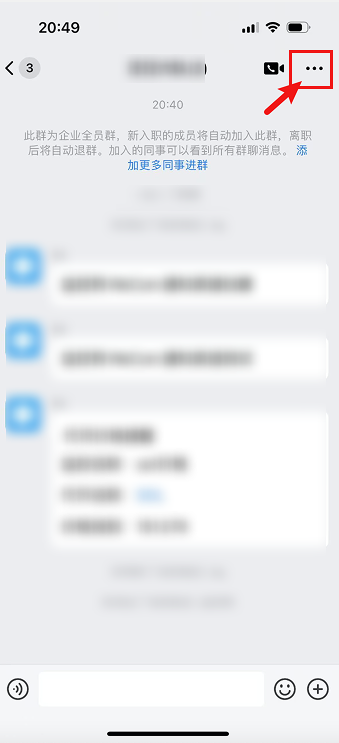
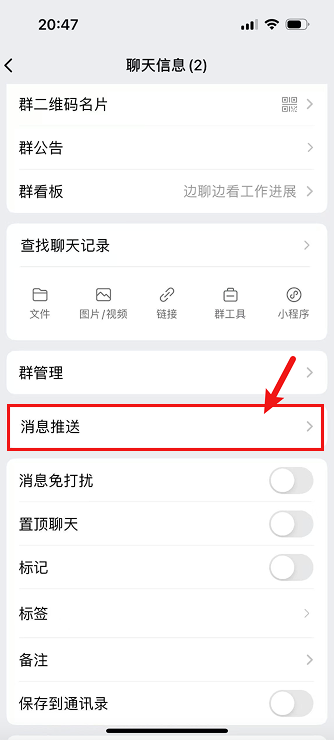
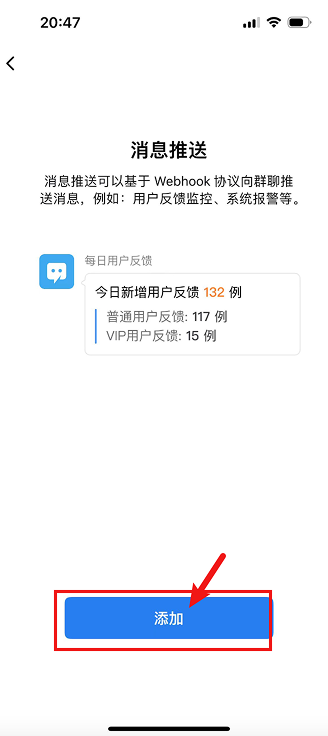
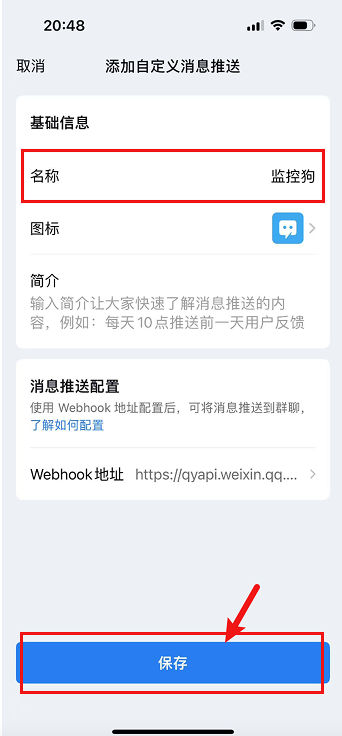
打开企业微信，选择一个你想发送报警通知的群聊，点击右上角...进入设置 -> 选择消息推送 -> 点击添加 -> 自定义机器人名称并保存

<Frame caption="企业微信配置步骤">
  <div style={{ display: 'grid', gridTemplateColumns: '1fr 1fr', gap: '10px' }}>
    <img src="https://mintcdn.com/alertdog/RCBluHwjsDCzwhrG/images/notification-channels/wx/workwechat-robot-settings.png?fit=max&auto=format&n=RCBluHwjsDCzwhrG&q=85&s=be3a63d6cb9946d16a0146214cd3651c" alt="1. 企业微信群聊设置界面" style={{ width: '100%' }} width="339" height="743" data-path="images/notification-channels/wx/workwechat-robot-settings.png" />

    <img src="https://mintcdn.com/alertdog/RCBluHwjsDCzwhrG/images/notification-channels/wx/workwechat-add-robot.png?fit=max&auto=format&n=RCBluHwjsDCzwhrG&q=85&s=91332f170b30c2678906fb939b5e0164" alt="2. 点击添加机器人" style={{ width: '100%' }} width="334" height="740" data-path="images/notification-channels/wx/workwechat-add-robot.png" />

    <img src="https://mintcdn.com/alertdog/RCBluHwjsDCzwhrG/images/notification-channels/wx/workwechat-robot-name.png?fit=max&auto=format&n=RCBluHwjsDCzwhrG&q=85&s=dba004e52c00e65be7b4e48f1305d80c" alt="3. 自定义机器人名称" style={{ width: '100%' }} width="328" height="736" data-path="images/notification-channels/wx/workwechat-robot-name.png" />

    <img src="https://mintcdn.com/alertdog/RCBluHwjsDCzwhrG/images/notification-channels/wx/workwechat-copy-webhook.png?fit=max&auto=format&n=RCBluHwjsDCzwhrG&q=85&s=f0228ebfc6ccd475bac833263b51ca81" alt="4. 复制 Webhook URL" style={{ width: '100%' }} width="342" height="736" data-path="images/notification-channels/wx/workwechat-copy-webhook.png" />
  </div>
</Frame>

最后复制 Webhook 地址备用（如下图）

<Frame caption="配置企业微信通知渠道">
  <img src="https://mintcdn.com/alertdog/RCBluHwjsDCzwhrG/images/notification-channels/wx/workwechat-alertdog-config.png?fit=max&auto=format&n=RCBluHwjsDCzwhrG&q=85&s=c47ba9d11765f36934e8c75d5825a8c3" alt="AlertDog 中配置企业微信通知渠道" width="338" height="736" data-path="images/notification-channels/wx/workwechat-alertdog-config.png" />
</Frame>

## 第二步：创建微信通知渠道并填写参数

打开监控狗 **添加新渠道** -> **企业微信** -> **输入上一步的 Webhook 地址** -> **确定**
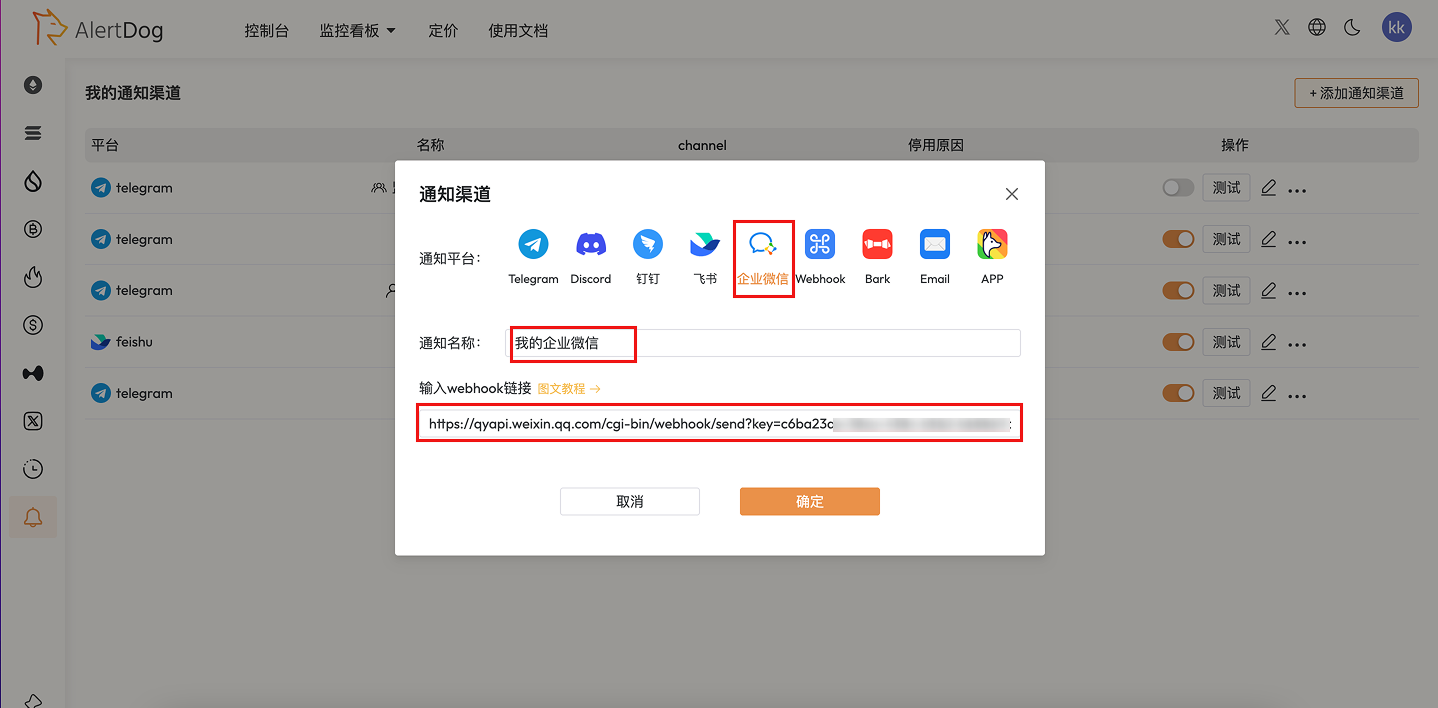
<Frame caption="测试通知成功">
  <img src="https://mintcdn.com/alertdog/RCBluHwjsDCzwhrG/images/notification-channels/wx/workwechat-test-notification.png?fit=max&auto=format&n=RCBluHwjsDCzwhrG&q=85&s=28e853e9fe90421be5d8caa3ba0883c8" alt="企业微信测试通知成功界面" width="1438" height="708" data-path="images/notification-channels/wx/workwechat-test-notification.png" />
</Frame>

## 第三步：创建完成

连接成功后，该通知渠道已添加成功，通知渠道列表中会显示该条通知渠道